Prompting is the key skill to unlocking generative AI. Saving your prompts guarantees you can show your work using generative AI as your assistant, preventing it from being your replacement. In this post of “Monday’s Prompts”, we look at two popular generative AI programs: Canva and Microsoft Designer.
Microsoft Designer and Canva are two companies that use generative AI to craft, design, and edit images. To instruct each company’s generative AI requires prompting, which is the key skill to unlocking generative AI. If you don’t know how to prompt, or what that means, then my mastering generative AI with prompting course will quickly and effectively get you up to speed.
In each image’s captions is the prompt I used so you can see the work that went into the image’s outcome. You’ll notice that each program doesn’t make the same image.
I was inspired by the Chicago Air and Water show, so that’s the basis for my prompt. What do you notice about what’s included and what isn’t? For me, it’s how big of a difference the scene is because of Canva’s word count limitation. Microsoft Designer doesn’t have a word count limitation and as a result I was able to make a much more detailed prompt, creating a more personal and inviting image.
Canva
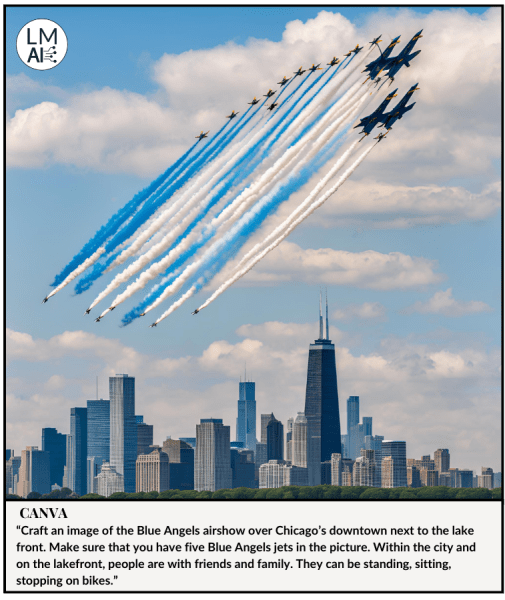
Because of the word count limitation in Canva, whose maximum limit is 49 words per prompt, I wasn’t able to get the detail I wanted to express in the full context of what I experienced at the Chicago Air and Water show.
Here’s the prompt I used for the image above:
“Craft an image of the Blue Angels airshow over Chicago’s downtown next to the lakefront. Make sure that you have five Blue Angels jets in the picture. Within the city and on the lakefront, people are with friends and family. They can be standing, sitting, stopping on bikes.”
As you can see in the image, Canva’s generative AI didn’t complete the prompt. There are no people in the picture, and there are more than five jets in the picture. A few of those jets look like flying stars to me. For graphic designers, showing their work by keeping this prompt would go a long way to describing why the picture doesn’t have people or a lakefront.
Microsoft Designer
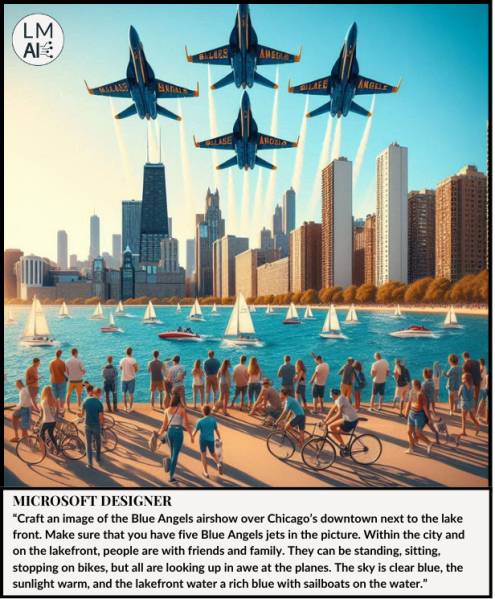
Unlike Canva, Microsoft Designer doesn’t have a word count limitation, allowing me to get the full detail of what I wanted to express, showing my experience at the Chicago Air and Water Show.
Here’s the prompt I used for the image above:
“Craft an image of the Blue Angels airshow over Chicago’s downtown next to the lake front. Make sure that you have five Blue Angels jets in the picture. Within the city and on the lakefront, people are with friends and family. They can be standing, sitting, stopping on bikes, but all are looking up in awe at the planes. The sky is clear blue, the sunlight warm, and the lakefront water a rich blue with sailboats on the water.”
As you can see in the image, Microsoft’s Designer completed 95% of the prompt! It’s missing a fifth Blue Angel’s jet, and the nose is cut off the front of the lead jet, but the rest of the image matches the prompt. One major flaw in the photo is the wording of the Blue Angle’s logo on the underside of the jet wings. Neither Canva nor Microsoft Designer could accurately write text within images. It’s a guarantee that you’ll have to edit the text in a generative AI image manually.
As you can see, Canva and Microsoft Designer are two generative AI programs that specialize in creating, editing, and improving images. What you can also see is that because of Canva’s word count limitation, its image isn’t as detailed as Microsoft Designer’s. This is why, when using generative AI, you keep the prompts to show the work and the edits that you’ve done, proving the AI is working as your assistant.
 LOGANMONDAYAI